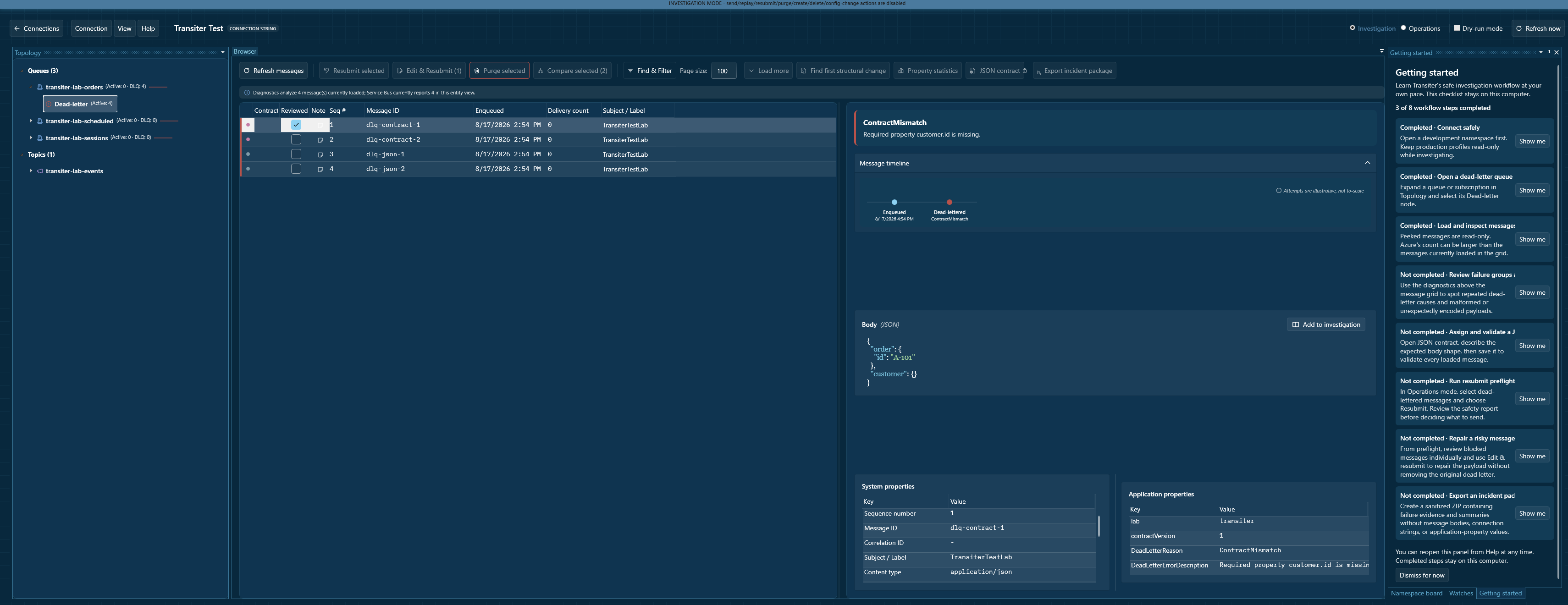
See the whole namespace
Move through queues, topics, subscriptions, and dead-letter subqueues from one focused topology.
Community edition · Windows
Transiter gives Azure Service Bus operators a focused desktop workspace for browsing entities, inspecting messages, and handling dead-letter queues safely.
Free Community edition. Optional Ko-fi support. No account required.
 + Open full size
From queue fire to clear next step
Transiter keeps topology, message content, properties, and deliberate message operations together so you can understand the queue before changing it.
Move through queues, topics, subscriptions, and dead-letter subqueues from one focused topology.
Peek message bodies, system properties, application properties, and dead-letter metadata without receiving or locking messages.
Filter loaded messages, adjust page size, add notes, and keep the evidence in view while you investigate.
Review a resubmit preflight before sending and keep risky messages untouched until you decide what should happen.
Edit and resubmit a corrected message while leaving the original dead-letter message available for evidence.
Use persistent read-only profiles, Investigation and Operations modes, dry runs, confirmations, and local replay history.
Safety is a feature
01Peek-first browsing lets you inspect messages without receiving or locking them.
02Investigation mode disables mutating actions across the workspace.
03Read-only profiles make production intent persistent and visible.
04Local secret protection encrypts saved connection-string secrets for the current Windows user.
Community first
The Community edition includes Service Bus topology and message browsing plus explicit message operations. If Transiter saves you time, support its development with an optional tip.